PlutoSlides.jl
Slideshows for Pluto notebooks
Keep Pluto's reactivity, present it like a Beamer or reveal.js deck.

Slides from headings
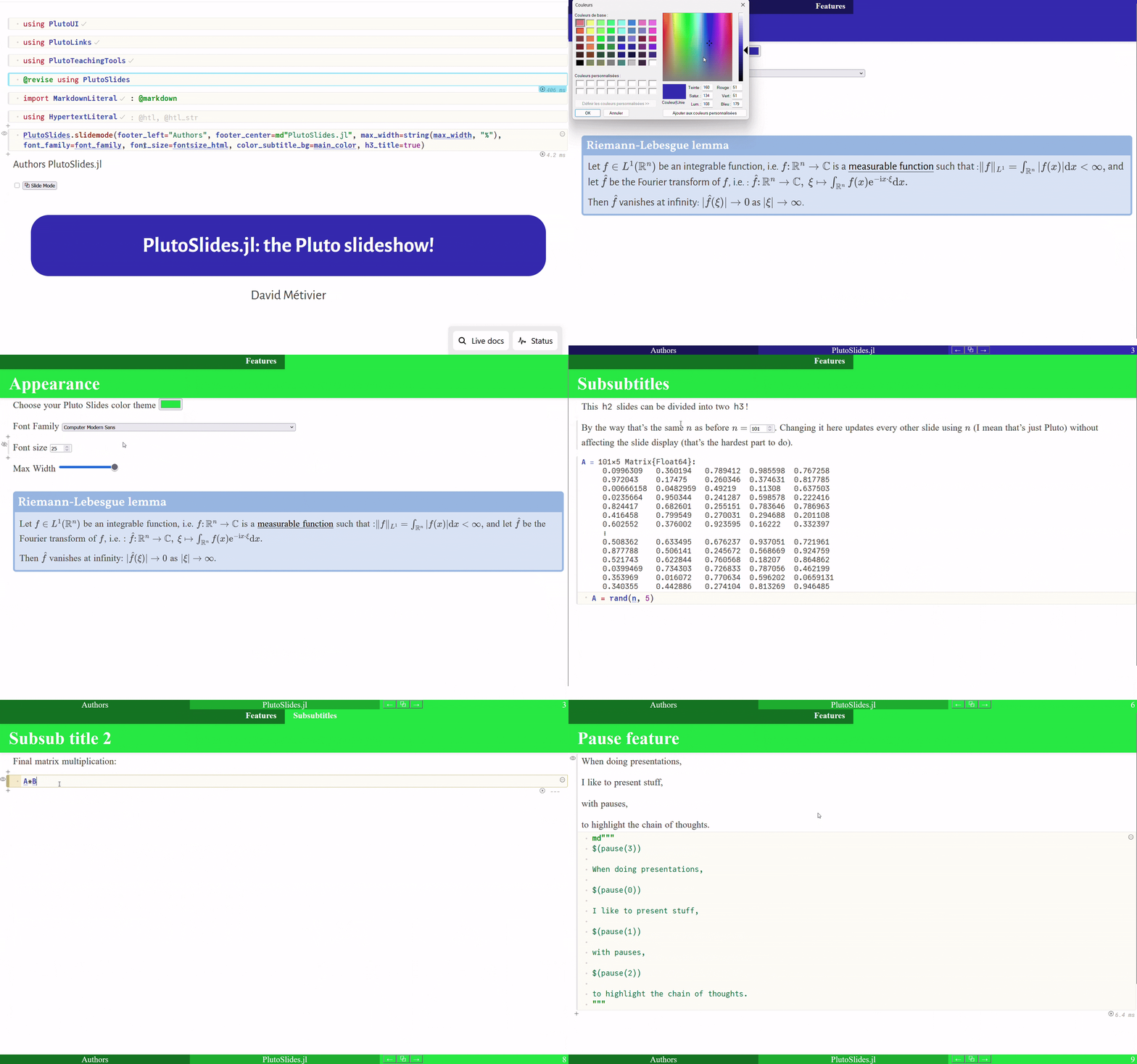
#, ## and ### markdown cells become section, slide and sub-slide, with title bands, footer and slide counter.
Beamer-like themes
Twelve built-in themes (Madrid, Berlin, Warsaw, Dracula...), logos, fonts and every color overridable.
PDF export
Print the deck to PDF from the browser, one slide per page (experimental).
Pluto has its own presentation mode. PlutoSlides is a separate, experimental take on it. A refresh (F5) sometimes helps.
I had no prior knowledge of JavaScript and only the basics of HTML and CSS, so most of the JavaScript and CSS in PlutoSlides was written with the help of AI/LLM coding assistants. In short: this package is very much vibe coded.
I did read the code and tried to understand it, but I cannot vouch for it the way I would for Julia code. If you spot something wrong, please open an issue or a PR — that is exactly the kind of feedback this package needs.
Installation
Add it to your Pluto notebook with like any other package using PlutoSlides in the notebook.
Quick start
Three cells turn a notebook into a deck:
using PlutoSlides# 1. Style and scripts (the notebook keeps the slide look even outside slide mode)slide_mode_settings(footer_left="Jane Doe", footer_center=md"PlutoSlides.jl")# 2. Optional title slideslide_mode_title(title="My talk", author=md"Jane Doe -- *Institute*")# 3. The toggleslide_mode_button()Click ⧉ Slide Mode, then move with the arrow keys or by clicking the left/right side of the screen. Or use the escape key to escape the slide mode. The HTML export of the notebook keeps the button, so a deck shared on pluto.land can be presented from the browser.
Starting in slide mode
By default a notebook opens as a notebook, and you enter slide mode with the button. Two keywords of slide_mode_button open it directly in slide mode instead:
| keyword | default | opens in slide mode... |
|---|---|---|
start_in_slide_mode_html | false | the notebook's HTML export (a file, pluto.land, an <iframe>...) |
start_in_slide_mode_notebook | false | the notebook running in Pluto |
start_slide (default 0) picks the slide they open on, numbered as in the slide counter (0 is the first slide); a number past the last slide opens the last one.
slide_mode_button(start_in_slide_mode_html=true) # export a deck that opens as slidesThe two are separate so that a deck can open as slides for its audience while you still edit it as a notebook. Slide mode starts once, when the page loads: rerunning the cell does not toggle it again, and the button still leaves and re-enters slide mode.
Writing slides
Slides are cut at headings, like in Pluto's presentation mode:
| heading | becomes | shown in |
|---|---|---|
# Section | a section slide | the thin top band of the following slides |
## Slide | a new slide | the title band |
### Sub-slide | a new slide (unless h3_title=false) | a band under the ## title |
A ## whose very next cell is a ### shares that slide, so a section split into sub-slides does not open on a blank page.
A heading is only well detected when it is alone in its markdown cell:
md"## My slide" # ✓ heading cellmd"Content" # ✓ content cellmd"## My slide\nContent" # ✗ top of the content cell will be cut offAnything Pluto can display can go in a slide: plots, widgets, tables... @htl from HypertextLiteral.jl is handy to mix text with live results: @htl"<p>The answer is $(x)</p>".
Title slide
slide_mode_title builds a title slide with a band, the authors, a row of figures and a footnote. The title band follows the active theme unless color is given.
slide_mode_title( title="PlutoSlides.jl: the Pluto slideshow!", author="You", footnote=md"[^1]: This is not an official Pluto project", figures=[Resource("https://raw.githubusercontent.com/dmetivie/PlutoSlides.jl/master/assets/logo_pluto_slides.svg", :width => "100%")],)Pauses
pause inserts an invisible marker; what follows is revealed step by step. pause(n) reveals it from step n, like Beamer's \pause[n]. It works best between paragraphs of a markdown cell and is still experimental.
md"""Always visible$(pause(1))Step 1$(pause(2))Step 2"""Embedding web pages
webpage shows a live web page in an <iframe>. offset crops the top of the page, for example to hide a site's navigation bar; a negative one pushes the page down instead:
webpage("https://julialang.org"; width="90%", ratio="45%", offset=80)It is a rewrite of ShortCodes.webpage (see Credits) and keeps that name; the old spelling myWebPage still works but is deprecated.
Embeds also print; see PDF export for the caveats.
Credits
- PlutoReport.jl gave the initial motivation. I used it before writing this package.
webpageis a rewrite ofShortCodes.webpagefrom ShortCodes.jl, whose name and one-call<iframe>short code it keeps. This version sizes the frame with a responsive aspect-ratio box instead of fixed pixelheight/width, and addsoffsetandcenter.